
A clinic inventory management system is software that tracks every medication, vaccine and consumable a clinic holds, from receipt to patient use. The system records batch and expiry data, warns staff before stock runs out, and reorders from suppliers automatically.
Private clinics in the United Arab Emirates carry an added duty. Medicines move through the national Tatmeen traceability platform, and stock records must stand up to a health authority inspection. Paper logs rarely survive that test.
This guide explains the features that matter, the UAE rules behind them, the selection criteria and a six-step rollout. It also shows where YOLO, the cloud clinic management system engineered by Yolo GmbH in Germany, takes over the stock workload.
What is a clinic inventory management system?
A clinic inventory management system is software that holds one live record of every stock item in a clinic. The record covers quantity, location, batch number, expiry date and supplier, and updates with each receipt and use.
Clinic inventory software belongs to the wider family of healthcare inventory tools. In most private clinics it runs as a module of the clinic management software. One record replaces five lists.
The system keeps a perpetual inventory: each movement changes the count at once. Every item carries a SKU, the unique code that separates one product and pack size from another.
Three roles touch the record daily: the storekeeper, the nurse and the pharmacist. The clinic owner and the operations manager read the totals.
The system is not an accounting ledger, and it is not a hospital materials suite. Its job is narrower: the right item, in date, at the point of care.
Medical supplies and stock a clinic tracks
Medical supplies and stock in a clinic fall into six groups, each with its own tracking rule.
| Stock group | Examples | What the record holds |
| Medications | Prescription medicines, injectables | Batch number, expiry date, storage condition |
| Vaccines | Seasonal and childhood doses | Lot number, expiry date, cold storage |
| Consumables | Gloves, syringes, wound dressings | SKU, stock level, reorder point |
| Medical equipment | Diagnostic devices, instruments | Serial number, location |
| Lab reagents and imaging supplies | Test reagents, contrast agents | Lot number, expiry date |
| Controlled medicines | Narcotic and psychotropic products | Register entry, custody, every movement |
Medical supply tracking differs from retail stock control on one point: expiry. A vaccine loses its value on a fixed date, whatever the demand.
Demand also swings. A flu wave empties a shelf of rapid tests within days.
Medical clinic vs hospital inventory scope
A medical clinic manages a narrower inventory than a hospital: fewer items, fewer storerooms and a handful of users.
| Dimension | Medical clinic | Hospital |
| Item range | A few hundred SKUs | A far larger catalogue across wards and theatres |
| Storage | One storeroom plus treatment rooms | Central store, ward stores, operating rooms |
| Users | A handful of staff | A dedicated materials management team |
| Special needs | Procedure kits, vaccines, consumables | Surgical instrument tracking, sterilisation cycles, inpatient pharmacy |
| Software fit | Module inside clinic software | Hospital-grade platform or ERP |
Example scale for a small facility: one storeroom, 200 to 250 unique items and 3 to 5 users. Hospital platforms answer a different problem.
A clinic gains more from inventory built into medical clinic management software than from a system designed for wards.
The next question is whether a spreadsheet already covers that scope.
Is a spreadsheet or free inventory tracker enough for a clinic?
A spreadsheet or free inventory tracker is enough for a very small clinic. That means a few dozen items, one storeroom and no medicines dispensed on site. Larger clinics lose expiry dates, batch records and accountability.
| Capability | Spreadsheet | Free tracker app | Dedicated system |
| Live stock level | Manual entry | Yes, basic | Yes, every user and branch |
| Expiry and batch alerts | No | Limited | Yes |
| Automatic reordering | No | No | Yes |
| Link to patient record and billing | No | No | Yes |
| Audit trail per user | No | Limited | Yes |
| Licence cost | None | None | Subscription |
The licence line hides the real bill.
Where manual logs and spreadsheets fail
Manual logs and spreadsheets fail at the point where two people update stock on the same day.
- Staff record usage at different times, so the file never matches the shelf.
- Versions conflict, and no one knows which copy is current.
- Expiry dates sit in a column that nobody filters until a clean-out.
- Identical products arrive under different manufacturer codes and create duplicate lines.
- The file shows a number, never the person who changed it.
Two failures follow. A stockout delays treatment in the middle of a consultation. Overstocking locks cash in boxes that expire on the shelf.
Where a free tracker stops being enough
A free tracker stops being enough once a clinic dispenses medicines, opens a second branch or bills insurers for consumables.
Searches for a clinic inventory management system free of charge usually end at a template or a single-user app. Both suit a solo practice with a short item list. Neither links stock to a patient record.
Why pay a subscription at all? A subscription replaces three hidden costs of free tools.
- Expired stock written off at purchase price.
- Staff hours spent on manual counts.
- Emergency orders placed at premium prices.
What a dedicated system changes
A dedicated system changes inventory from a weekly counting task into a record that updates itself with every receipt and use.
- Shortages surface as alerts before the shelf is empty.
- Expiring items appear on a list while there is still time to use them.
- Every adjustment carries a name, a date and a reason.
- Stock value and usage per treatment become visible to the clinic owner.
YOLO delivers this change inside one clinic platform. Its inventory of medical consumables reorders automatically and sits beside the EMR, billing and accounting. No separate tool. No double entry.
The mechanics behind those results follow one fixed loop.
How does the clinic inventory management process work?
The clinic inventory management process works as a five-stage loop: receive, store, use or dispense, count and reconcile, then reorder. Each stage writes a record, and the last stage feeds the first.
The flow chart below shows the loop in order.
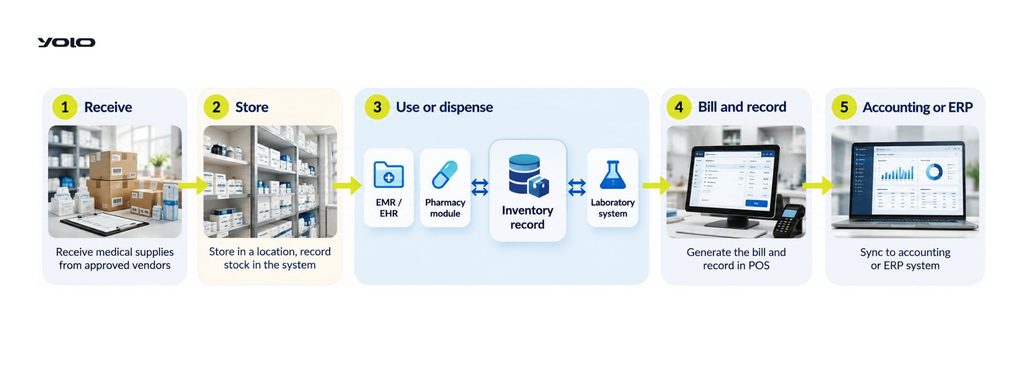
Five stages, five records.
- Receive: the storekeeper checks the delivery against the purchase order and the supplier invoice. One barcode scan captures the batch number, lot number and expiry date.
- Store: each item gets a fixed location. FIFO (first in, first out) places older stock in front, so the earliest expiry date leaves first.
- Use or dispense: the nurse or pharmacist deducts the item against the patient visit. The stock level drops at that moment.
- Count and reconcile: a cycle count checks one group of items against the system on a fixed schedule. Stock reconciliation, the step that makes the system match the shelf, logs every difference with a reason. Expired or damaged items leave through a documented write-off.
- Reorder: stock reaches its reorder point and the system raises a purchase order. The supplier lead time decides how early that point sits.
YOLO runs stage four from the mobile app. The storekeeper enters physical quantities at the shelf, and the web view lists them against system quantities per product. The FAQ page explains how a stock count runs in YOLO.
Short supplier lead times allow a just-in-time approach: smaller stock, more frequent orders. Long lead times demand a larger buffer.
Does the loop need all five stages in a small clinic? The loop needs all five stages at any size. A skipped count hides errors until an item runs out.
Each stage depends on a specific software feature.
Which features should a clinic inventory system have?
A clinic inventory system should have eight features, each tied to one operational outcome. The list runs from real-time visibility and expiry tracking to reordering, mobile scanning, kits and audit-ready reports.
| Feature | Operational outcome |
| Real-time stock visibility | No shortage discovered during a consultation |
| Batch, lot and expiry tracking | Less expired stock, faster recall response |
| Low-stock alerts and auto-reordering | Orders placed on time without manual checks |
| Medical inventory app with barcode scanning | Fewer typing errors, faster receiving |
| Supply chain and purchase order records | Clear supplier history and price control |
| Multi-branch stock and transfers | Stock moved between branches before reordering |
| Procedure kits and per-patient usage | Accurate cost and billing per treatment |
| Reports, audit trail and user roles | Inspection-ready records and accountability |
The first three decide daily safety. A single-doctor clinic starts there, and a group adds the remaining five.
Real-time stock visibility
Real-time stock visibility shows the current stock level of every item, by location, the moment staff receive, use or move it.
A dashboard lists quantities on hand, items below minimum and stock value in AED. The operations manager reads it from any device. Nobody walks to the storeroom to check.
Batch, lot and expiry tracking
Batch, lot and expiry tracking ties every unit to its batch number, lot number and expiry date from receipt to use.
- Expiry date tracking sends alerts at set intervals before an item expires.
- FIFO picking directs staff to the earliest expiry first.
- Serial numbers follow individual pieces of medical equipment.
Batch and lot tracking also answers the product recall question. One search by lot number lists every affected unit and its location. The clinic pulls those units at once.
Low-stock alerts and auto-reordering
Low-stock alerts and auto-reordering warn staff at a minimum stock level and raise a purchase order at the reorder point.
The reorder point, the quantity that triggers a new order, follows a simple rule: weekly usage multiplied by supplier lead time, plus a safety buffer.
Example: a clinic uses 10 boxes of gloves a week. A 1-week lead time plus a 1-week buffer sets the reorder point at 20 boxes.
Low stock alerts depend on real usage data. Demand forecasting reads past consumption and raises the threshold before seasonal peaks, such as flu vaccines in winter. Automated alerts reach the storekeeper before the shelf empties.
YOLO applies automated reordering to medical consumables. Stock that reaches its threshold triggers an order to the supplier without a manual request.
Medical inventory app with barcode scanning
A medical inventory app with barcode scanning lets staff receive, issue and count stock from a phone at the shelf.
A barcode inventory system reads three code types.
- Linear barcodes on boxes of consumables.
- QR codes printed by the clinic for items without a manufacturer code.
- The GS1 DataMatrix on medicine packs.
One GS1 DataMatrix scan carries four data points: product code, serial number, batch number and expiry date. Typing disappears. So do typing errors.
YOLO runs as a web app with iOS, Android and Huawei apps. Stock counts start from the mobile app at the shelf.
Supply chain and purchase order records
Supply chain and purchase order records store every supplier, price, purchase order and delivery in one history.
- Supplier lead time per item, measured from order to delivery.
- Price history across suppliers for the same product.
- Supplier invoices matched to received quantities.
Two suppliers per critical item protect the clinic from one delayed shipment. The record shows which supplier delivered late, and how often.
Multi-branch stock and transfers
Multi-branch stock and transfers give each location its own stock record and move items between branches through a logged request.
A stock transfer follows three steps.
- One branch requests the item.
- A manager approves the request.
- Both stock levels update on dispatch and receipt.
Multi-location inventory turns surplus in one branch into supply for another. YOLO runs every branch of a group on one system, so the owner reads all locations from one dashboard.
Procedure kits and per-patient usage
Procedure kits and per-patient usage bundle the items one treatment needs and deduct them from stock as the treatment happens.
A procedure kit, also called a bill of materials, lists every consumable for one procedure. Consumption tracking then shows the real material cost of each treatment. Billing captures every item used.
YOLO adds a treatment pricing and profitability calculator. The clinic owner sees cost and profit for each treatment.
Reports, audit trail and user roles
Reports, an audit trail and user roles show what stock moved, who moved it and who holds permission to change it.
- Reports: stock value, inventory turnover, usage against waste, expired items and purchase history.
- Inventory audit trail: a dated log of every count, adjustment, order and removal, with the user’s name.
- Role-based access: each user sees and changes only what the role allows.
YOLO covers this layer with role management and a real-time reporting dashboard. Each employee receives rights per module.
Features gain their full value once stock connects to the rest of the clinic.
How does it connect with other clinic software?
A clinic inventory system connects with other clinic software through shared records. The EMR, billing, accounting, pharmacy and laboratory read and write the same stock data. One entry updates every connected system.
The diagram below maps each connection.
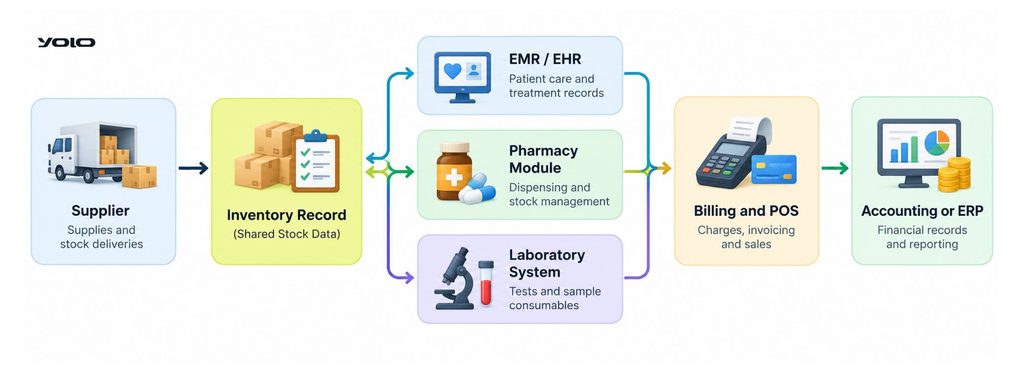
| Connected system | Sends to inventory | Receives from inventory | Result |
| EMR / EHR | Items used per visit | Stock availability | Complete treatment history |
| Billing and POS | Sales and charges | Item cost and price | Every used item billed |
| Accounting or ERP | Supplier payments | Stock value, purchases | Accurate ledger |
| Pharmacy module | Dispensed prescriptions | Batch and expiry data | In-date dispensing |
| Laboratory system | Test orders | Reagent levels | No interrupted tests |
Five systems. One stock record. Disconnected systems force double entry.
EMR and patient records
EMR integration writes every item used during a visit into the patient record and deducts it from stock in the same step.
The link works in both directions. The EMR, or EHR, tells inventory what the doctor used. Inventory tells the EMR what is available before treatment starts.
YOLO keeps the EMR and inventory on one platform, so no interface sits between them.
Billing, POS and accounting
Billing, POS and accounting links turn each used item into an invoice line and each supplier invoice into a ledger entry.
Missed charges are the quiet loss here. A dressing used but never billed reduces margin on every visit.
A clinic financial management system closes that gap by reading stock usage directly. Larger groups pass the same data to an ERP.
Pharmacy, lab and imaging stock
Pharmacy, lab and imaging stock follow the same record but add their own rules for dispensing, reagents and contrast agents.
- Pharmacy module: stock drops on dispensing, and pharmacy inventory confirms availability before the pharmacist completes a prescription.
- Laboratory system: test orders consume lab reagents, and low levels trigger alerts before a test fails to run.
- Imaging: contrast agents and other imaging supplies carry expiry dates that the system watches.
Does every link need its own software? Every link runs inside one product once inventory is a module of the clinic management software. Separate tools need a custom interface for each connection.
Connected records also carry legal weight in the UAE.
What do UAE regulations require from clinic inventory records?
UAE regulations expect clinic inventory records to show four things: source, custody, expiry and disposal. Tatmeen covers the source, and the health authorities of each emirate cover the rest.
Foreign guides quote foreign rules. A UAE clinic answers to its own regulators. The rules are local, not global.
| Record | What it shows | Related UAE framework |
| Source | Pack identity and supplier | Tatmeen traceability |
| Custody | Who received, held and dispensed | Controlled-medicine registers |
| Expiry | In-date stock in clinical areas | Health authority pharmacy standards |
| Disposal | How expired or recalled stock left | Emirates Drug Establishment services |
Each clinic confirms its exact duties with its licensing authority.
Tatmeen scans on receipt and dispensing
Tatmeen is the UAE platform that traces medicines through GS1 serialisation, with scans on arrival and on dispensing.
- MOHAP issued the traceability decree in June 2021.
- MOHAP, DOH Abu Dhabi and DHA launched the platform officially in February 2023.
- Medicine packs carry a GS1 DataMatrix on the secondary packaging.
- Supply chain participants in the UAE identify themselves with a GLN from GS1 UAE.
- Hospitals and pharmacies validate products on arrival and on dispensing.
Tatmeen compliance reaches a clinic through its dispensing point. A clinic that dispenses on site needs software and scanners that read the GS1 DataMatrix.
The national track-and-trace platform serves one purpose at the shelf. The scan confirms the pack is genuine and in date before it reaches the patient.
Health regulator by emirate: MOHAP, DHA, DOH
The health regulator of a clinic depends on its emirate: DHA in Dubai, DOH in Abu Dhabi and MOHAP in the Northern Emirates.
| Emirate | Regulator | Health information exchange |
| Dubai | DHA | NABIDH |
| Abu Dhabi | DOH Abu Dhabi | Malaffi |
| Northern Emirates | MOHAP | Riayati |
The Emirates Drug Establishment adds a federal layer. It regulates medical and pharmaceutical products nationwide, and MOHAP has transferred a set of product services to it.
Exchange connectivity is a licensing matter, and the right exchange depends on location. This guide explains which exchange applies to your clinic: NABIDH, Malaffi or Riayati.
YOLO connects to all three exchanges. One system serves every branch of a group.
Controlled-medicine registers
Controlled-medicine registers record every receipt, dispensing and balance of narcotic, controlled and semi-controlled drugs held by a facility.
- MOHAP provides a service for clinics, pharmacies and medical warehouses to obtain a register for controlled or semi-controlled drug custody.
- DHA runs prescribing and dispensing of these medicines through a unified electronic platform for doctors and pharmacists.
- DOH Abu Dhabi requires every narcotic, psychotropic and semi-controlled product to appear in its register.
Controlled medicines need two matching numbers. The official register holds one, and the inventory system holds the other. A daily comparison catches a discrepancy the day it appears.
The inventory system supports the official register. It never replaces it.
Expiry, recall and disposal records
Expiry, recall and disposal records document which stock expired, which lots a recall covered and how the clinic removed them.
- Expiry: DHA pharmacy guidelines recommend a record of expiry checks in the pharmacy and clinical areas.
- Recall: the services moving to the Emirates Drug Establishment include suspension and recall of medical products nationwide.
- Disposal: the same body handles approval for the safe disposal of medical products.
A product recall tests the record fast. Lot-level stock data answers three questions at once: which units, which shelf, which patients.
These rules shape the selection criteria that follow.
How do you choose a clinic inventory system?
Choosing a clinic inventory system comes down to six checks. They cover clinic size, module type, hosting, build type, total cost and vendor support. Each check removes options that do not fit.
| Check | What to confirm with the vendor |
| Size | Items, users and branches covered by the plan |
| Module type | One shared database for stock, EMR and billing |
| Hosting | Data location and server responsibility |
| Build type | Ready product or built to order |
| Total cost | Year-three cost with every fee included |
| Support | Response time and support language |
Score every clinic inventory management system on the same six lines before any demo.
Clinic size, branches and item count
Clinic size, branches and item count set the scope: a single-doctor clinic needs alerts and counts, a group needs transfers and consolidated reports.
- Single-doctor clinic: low-stock alerts, expiry tracking, simple counts.
- Polyclinic: procedure kits, per-department usage, role-based access.
- Multi-branch group: stock transfers, consolidated stock value, one dashboard.
Growth changes the answer. A system sized for one room fails at three.
Standalone tool or clinic-management module
A standalone tool tracks stock alone, while a clinic-management module shares one database with the EMR, billing and accounting.
Standalone tools start fast. They also leave a gap: someone retypes usage into the billing system. A module removes that step.
This guide details what a clinic management system covers. YOLO follows the module model, with inventory inside the same platform as records and finance.
Cloud or on-premise hosting
Cloud hosting runs the system in a browser with no server in the clinic, while on-premise hosting keeps a server on site.
| Factor | Cloud-based (SaaS) | On-premise |
| Hardware | None in the clinic | Server and backup on site |
| Updates | Included by the vendor | Installed by clinic IT |
| Access | Any branch, any device | Clinic network |
| Cost shape | Subscription | Licence plus maintenance |
Cloud-based inventory management suits multi-branch clinics because every location reads the same record. UAE health data rules make hosting location, encryption and access roles part of the decision.
A web-based clinic management system guide explains the model in depth. YOLO needs no hardware in the clinic.
Off-the-shelf, custom or no-code build
Off-the-shelf software arrives ready, a custom build follows the clinic’s own specification, and a no-code platform sits between the two.
| Option | Ready to use | Maintenance | Suits |
| Off-the-shelf | After setup and migration | Vendor | Most private clinics |
| No-code platform | After the clinic builds its app | Clinic staff | Clinics with a technical owner |
| Custom build | After a development project | Developer under contract | Unusual workflows |
A custom build also makes the clinic responsible for every UAE compliance change.
Pricing model and total cost
Pricing model and total cost cover the subscription plus setup, migration, training, hardware and support over several years.
Total cost of ownership, the full three-year bill in AED, is the number to compare. A low monthly fee with paid migration and paid support costs more than it looks.
This guide lists practice management software costs in the UAE.
Is a subscription cheaper than a one-off licence? A subscription costs less at the start, and a licence adds server, maintenance and upgrade costs later. Compare the three-year figure for both.
YOLO removes three lines from the bill: no hardware, free migration and cancel-anytime terms.
Support, training and data migration
Support, training and data migration decide how fast staff trust the new stock numbers.
- Support: response time stated in writing, in Arabic and English.
- Training: sessions per role, from storekeeper to clinic owner.
- Data migration: item list, suppliers and opening balances moved by the vendor.
YOLO backs support with a 24-hour guarantee or the clinic’s money back. Migration from any other system comes free.
The six checks point to a short list of option types.
What is the best healthcare inventory software for UAE clinics?
The best healthcare inventory software for UAE clinics is a cloud module inside the clinic management system. It connects stock to the EMR, billing and the UAE health information exchanges. YOLO fits that profile.
Four criteria support that answer.
- One database for stock, patient records and billing.
- Cloud hosting with no hardware in the clinic.
- Connection to NABIDH, Malaffi and Riayati for every emirate of operation.
- Arabic and English operation with local support.
Healthcare inventory choices in the UAE start with licensing. Features come second.
| Option | Fits | Hosting | Integrations | UAE exchange coverage | Pricing model |
| YOLO clinic management system (publisher’s product) | Private outpatient clinics, single to multi-branch | Cloud, no hardware | EMR, billing, HR and accounting on one platform | NABIDH, Malaffi, Riayati | Subscription, cancel anytime |
| Spreadsheet or free tracker | A few dozen items, no dispensing | Local file or single app | None | None | No licence fee |
| Standalone inventory app | Clinics needing stock control only | Mostly cloud | Separate link to EMR and billing required | Outside its scope | Subscription |
| Hospital-grade platform | Hospitals with wards and operating rooms | Cloud or on-premise | Broad, built for inpatient flow | Depends on the vendor | Enterprise licence |
| Custom or no-code build | Clinics with technical staff | Chosen by the clinic | Built to order | Built to order | Development plus maintenance |
Medical inventory management software built for hospitals overshoots a clinic. It tracks surgical instruments and sterilisation cycles that an outpatient practice never uses. A spreadsheet undershoots.
Tatmeen readiness applies to every row. Before signing, confirm that the app reads GS1 DataMatrix codes on receipt and on dispensing.
Is a publisher’s own product a fair first row? The table labels the first row as the publisher’s product so the reader weighs it openly. The four criteria above let any clinic test the claim in a demo.
The next section sets out exactly what YOLO covers.
Which YOLO services cover clinic inventory and operations?
YOLO services cover clinic inventory and operations from one cloud platform. The platform combines consumables stock, automatic reordering, EMR, scheduling, billing, HR and accounting. Yolo GmbH engineers it in Germany for UAE private clinics.
| Clinic need | YOLO service | Operational outcome |
| Never run out of consumables | Inventory with automatic reordering | Orders placed without manual checks |
| Trust the stock numbers | Stock counts from the mobile app | Shelf and system match |
| Bill and record in one place | EMR, billing and accounting | No double entry |
| Keep the licence path clear | NABIDH, Malaffi and Riayati connectivity | One system for every emirate |
| Get help fast | 24-hour support guarantee | A committed response window |
One platform, one login.
Consumables stock with automatic reordering
Consumables stock with automatic reordering keeps gloves, syringes and other medical consumables above their threshold without a manual order.
The storekeeper stops chasing quantities. YOLO watches each item and orders from the supplier once stock reaches its limit. The result: fewer stockouts of everyday items.
Stock counts from the mobile app
Stock counts from the mobile app let the storekeeper enter physical quantities at the shelf and compare them with system quantities.
- Open warehouse management in the YOLO clinic app and start a new count.
- Enter the physical quantity of each product.
- Open the web view to read physical against system quantity per product.
- Download the result as a PDF for the clinic file.
EMR, scheduling, billing, HR and accounting
EMR, scheduling, billing, HR and accounting run on the same platform as inventory, so one login covers the whole clinic.
- Electronic medical records for every visit.
- AI-optimised online appointment scheduling with reminders by WhatsApp, SMS, email and push notification.
- Digital patient onboarding and a patient app.
- Staff time tracking, leave, payroll and role management.
- Accounting, vouchers and a patient wallet.
- A treatment pricing and profitability calculator.
- A real-time reporting dashboard.
The full list sits on the YOLO features page.
NABIDH, Malaffi and Riayati connectivity
NABIDH, Malaffi and Riayati connectivity links YOLO to the health information exchanges of Dubai, Abu Dhabi and the Northern Emirates.
Exchange integration is a licensing matter in the UAE, not an optional feature. A group with branches in several emirates covers all of them with one system.
The latest update covers YOLO’s Malaffi integration for Abu Dhabi clinics.
German engineering and 24-hour support
German engineering and 24-hour support define the service behind YOLO: Yolo GmbH builds the platform and backs it with a 24-hour support guarantee.
- Engineered in Germany by Yolo GmbH.
- Certified under ISO quality and information-security management standards.
- Support guaranteed within 24 hours, or money back.
- Arabic and English operation.
- No hardware, cancel-anytime terms and free migration from any other system.
Does switching systems put existing data at risk? Existing data moves with the clinic: YOLO migrates records from any other system free of charge.
A clear rollout plan turns that platform into daily routine.
How do you implement the system step by step?
Implementing a clinic inventory management system takes six steps. The sequence runs from a stock audit and clean item codes to reorder levels, labelling, training and report reviews.
- Audit current stock and usage.
- Standardise item names and codes.
- Set minimum levels and reorder points.
- Label stock and migrate records.
- Train staff and assign roles.
- Review reports and adjust levels.
The order matters here. Clean data in step two prevents wrong alerts in step three.
Audit current stock and usage
A stock audit counts every item on the shelf and records recent usage before any software setup.
- Count each storeroom and treatment room.
- Remove expired and damaged items, and record them.
- List usage per item for the last three months.
The audit produces one verified list with quantities and expiry dates.
Standardise item names and codes
Standardised item names and codes give every product one name, one SKU and one unit of measure.
Manufacturers assign different codes to identical products. Two codes create two lines, and two lines create duplicate orders.
One naming rule fixes that: product, size or strength, pack. Example: “Nitrile gloves, medium, box of 100”.
Set minimum levels and reorder points
Minimum levels and reorder points come from real usage, supplier lead time and storage space.
- Minimum stock level: the quantity that triggers a warning.
- Reorder point: the quantity that triggers a purchase order.
- Seasonal items: reviewed several times a year, flu vaccines first.
Label stock and migrate records
Labelling and migration place a scannable code on every item and load the clean list into the system.
- Use manufacturer barcodes where they exist.
- Print QR codes or barcode labels for unmarked items.
- Import items, suppliers and opening balances.
YOLO migrates data from any previous system at no charge.
Train staff and assign roles
Training and role assignment give each user the screens and permissions the job needs.
| Role | Daily task in the system |
| Storekeeper | Receives, counts and transfers stock |
| Nurse | Records items used per visit |
| Pharmacist | Dispenses and checks expiry |
| Operations manager | Approves orders and adjustments |
| Clinic owner | Reads stock value and reports |
Review reports and adjust levels
Report reviews compare planned levels with real consumption and correct the reorder points each month.
- Stockouts in the period, by item.
- Expired items and their value.
- Inventory turnover per stock group.
Each review tightens the next forecast.
Does the rollout interrupt patient care? The rollout fits around clinic hours: the count runs after closing, and training runs per role in short sessions.
The questions below cover what clinic owners ask next.
Frequently asked questions
Clinic owners raise four further questions about inventory software. The answers below cover product types, UAE clinic platforms, counting methods and tracking technology.
What are the top 5 inventory management software?
The top 5 inventory management software types for clinics are: management module, standalone app, hospital platform, no-code build and spreadsheet tracker.
Rankings by brand change every year. Fit by type stays stable. A private clinic in the UAE gains most from the first type, where stock shares one database with records and billing.
What is the best clinic management software in the UAE?
The best clinic management software in the UAE connects natively to NABIDH, Malaffi and Riayati and runs in Arabic and English.
YOLO meets those conditions and adds HR, inventory, accounting and profitability tools to the EMR. A 24-hour support guarantee backs the service.
What is the difference between periodic and perpetual inventory?
The difference between periodic and perpetual inventory is timing: periodic counts update stock at intervals, perpetual records update with every transaction.
| Method | How stock updates | Typical tool | Main risk |
| Periodic inventory | After scheduled manual counts | Spreadsheet or paper log | Errors stay hidden between counts |
| Perpetual inventory | With every receipt, use and transfer | Inventory software with scanning | Accuracy depends on disciplined scanning |
Which tracking technology do clinics need: RFID or barcodes?
The tracking technology most clinics need is the barcode, including QR codes and the GS1 DataMatrix on medicine packs.
RFID reads tagged items by radio waves without a line-of-sight scan. That strength serves hospitals that track surgical instruments and large stores. A clinic with a few hundred items reaches the traceability it needs with barcodes and a phone.
Conclusion
A clinic inventory management system gives a UAE clinic one trusted stock record. The record shows what sits on the shelf, when it expires, who used it and when to reorder.
Three decisions shape the result: connect stock to the EMR and billing, scan medicines in line with Tatmeen, and review the numbers every month. Spreadsheets cover none of the three.
YOLO brings those pieces onto one German-engineered platform for private clinics across the United Arab Emirates. Consumables reorder automatically, counts run from the mobile app, and NABIDH, Malaffi and Riayati connectivity keeps the licence path clear.
See the stock workflow on your own clinic’s data: book a 30-minute demo or message the YOLO team on the UAE WhatsApp line.
Technical Reviewer for Medical Management Systems & Digital Transformation Consultant for Clinics